
Review a transcript
Find what was said, check speaker labels, and return to the original conversation.
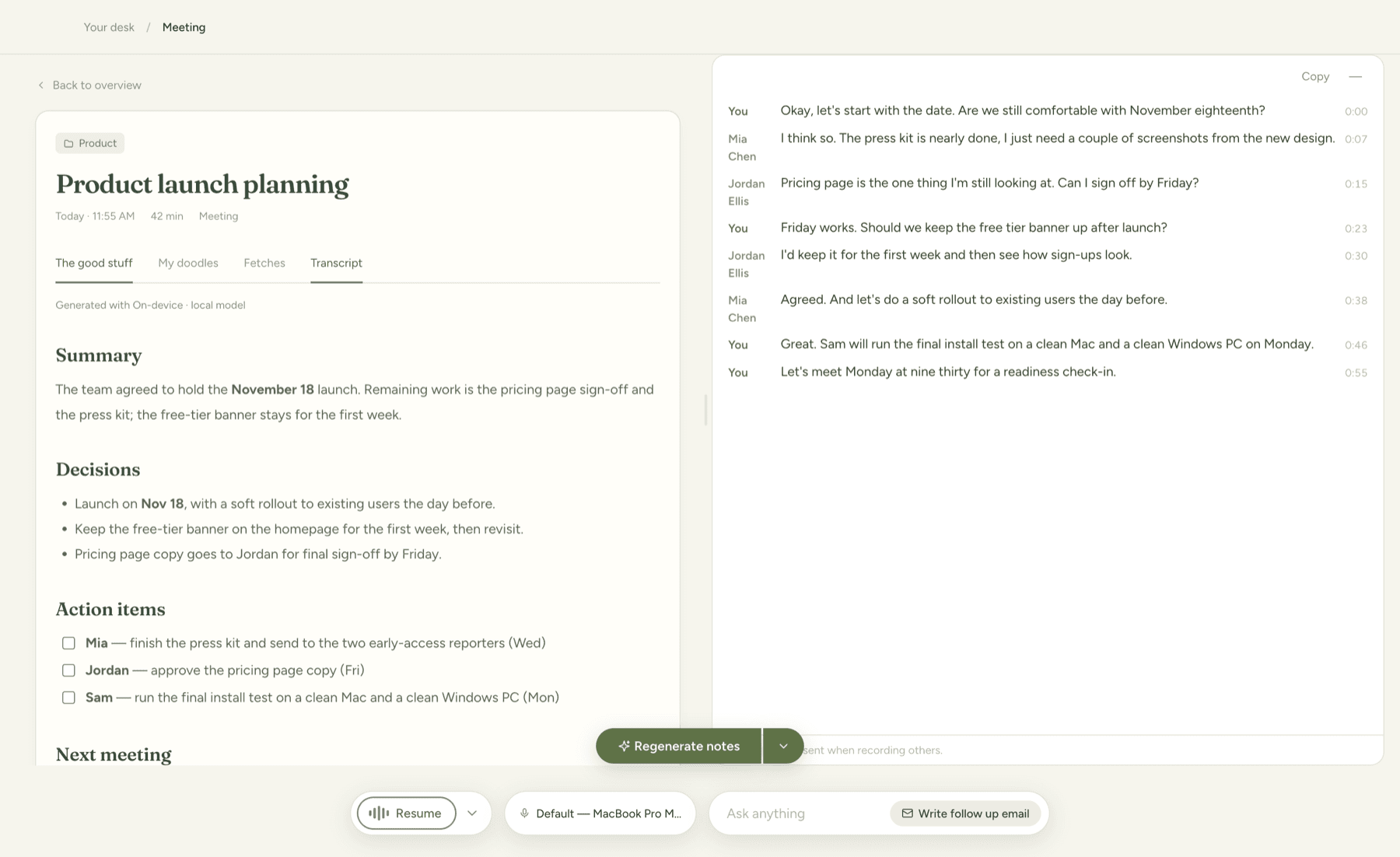
macOS · Windows betaOpen the transcript
- Open a recorded meeting from the overview.
- Open its transcript view.
- Read the speaker labels and timestamps to find the part you need.
- Correct speaker names where the app offers label editing.
A new meeting needs captured speech before it has a transcript. If a recording produces no text, check recording troubleshooting.
Check important details
Transcription can mishear names, numbers, acronyms, and overlapping speech. Confirm important decisions against the original conversation before sharing a summary. Speaker labels help organize the transcript; they are not proof of a person’s identity.
When a saved recording is available, use playback to check unclear passages. Playback depends on retaining the local audio. Cloud Sync does not upload that recording.
Use it with your notes
Add context in your rough notes when a transcript needs clarification, then generate or review the AI notes. Treat the summary as a draft: the source conversation is the reference for what was actually said.
Before sharing, decide whether the recipient needs the transcript at all. The web sharing controls let you choose whether to include it.